Candid Window Portrait of Indian Woman in Black Saree

A candid window portrait can turn a simple indoor scene into a beautiful and cinematic photo. This style combines a black saree, soft natural light, and Venetian blind shadows falling across the face and background. The result feels realistic, elegant, and slightly dramatic without looking overly edited.
With AI image tools, you can create this type of portrait by using a detailed prompt that explains the woman’s outfit, pose, lighting, shadows, camera angle, and overall mood. In this guide, you will learn how to create a realistic candid window portrait of an Indian woman in a black saree.
What Is a Candid Window Portrait?
A candid window portrait is a photo that looks naturally captured near a window rather than carefully posed in a studio. The window provides soft directional light, while blinds can create interesting lines and patterns across the subject.
For this concept, the woman wears a black saree and stands close to a window. Venetian blind shadows fall naturally across parts of her face, saree, and the wall behind her. This gives the image a cinematic and editorial appearance.
Why Is This Portrait Style Trending?
This type of AI portrait is popular because it looks simple but has a strong visual mood. The combination of natural lighting and patterned shadows adds depth to the image.
The black saree also creates a clean contrast against the brighter window light. Instead of using a busy background, the focus stays on the woman’s expression, clothing, and lighting. If you want to experiment with a more dramatic visual style, try triple exposure cinematic portrait AI prompt for a different approach to AI portrait photography.
AI Prompt for Candid Window Portrait
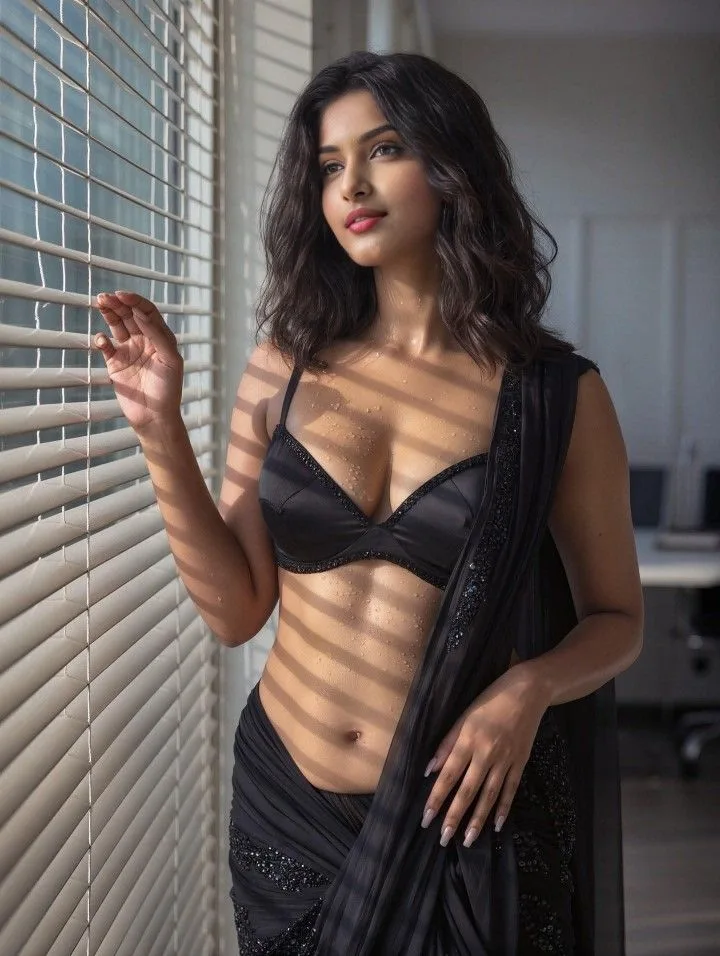
Prompt
How to Create This Portrait With AI
You can create the image by following these simple steps:
Important Details for a Realistic Result
Black Saree
The saree should look like real fabric rather than a digitally painted outfit. Mention natural folds, fabric texture, and an elegant drape to make the clothing more believable.
Venetian Blind Shadows
The shadows are one of the most important parts of this concept. They should appear as soft horizontal lines created by sunlight passing through blinds. Avoid making the lines too dark or perfectly uniform.
Natural Expression
A candid expression makes the portrait feel less artificial. Instead of asking the woman to smile directly at the camera, use a relaxed expression with her eyes looking slightly away.
Window Lighting
Use soft afternoon or golden-hour window light. The light should come from one side and create gentle highlights on the face while leaving some areas naturally shaded. For a warmer look with natural sunlight, you can try golden hour portrait AI prompt for a young Indian man and experiment with a different lighting style.
Tips for Better AI Portraits
Common Problems
Why the Black Saree Works So Well
Black creates a strong visual contrast with sunlight coming through the window. It also gives the portrait an elegant and timeless appearance.
When combined with warm natural light, the black saree can show subtle highlights and fabric details without losing its deep tone. The Venetian blind shadows then add another layer of visual interest. If you prefer outdoor settings, this candid portrait of a young Indian man in a Kash grass meadow offers another idea for creating a natural-looking AI image.
Final Words
The candid window portrait of an Indian woman in a black saree is a simple but powerful AI photography concept. Its beauty comes from realistic lighting, natural expression, detailed clothing, and soft Venetian blind shadows.
If you use the right prompt and keep the lighting realistic, you can create an image that looks much closer to a professionally captured editorial portrait than a typical AI-generated picture.
Rahul Sharma is an AI prompt creator and content writer at Faymasin. He shares creative AI photo prompts for boys, girls, couples, and cinematic portraits. His goal is to help readers find ready-to-use prompts and create images with AI tools like ChatGPT and Gemini.